

Why Do You Need MediaTek DA VCOM Drivers
VCOM is a compact software that is helpful to a large number of users whose devices are MTK powered. Since your Windows computer or laptop cannot locate a device with an MTK chip, this driver aids in the correct identification of your device.
How to Install VCOM Drivers for SP Flash Tool:
- Launch Device Manager on my PC. Select any item and select Actions > Add Hardware Legacy.
- Click Next now and choose Install drivers manually.
- Press Next and select "Have disk."
- Choose your OS's VCOM drivers from the browse option.
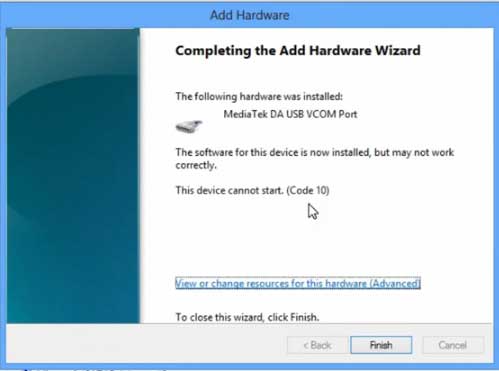
- after it's finished. This is the screen that you will see:
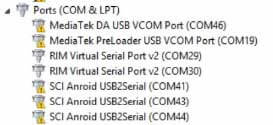
Once the installation process is complete, open device management and locate a device that looks like this:
How to unbrick Mediatek MTK device – SP Flash Tool
Step 1: Initially, get the official "Stock ROM / Firmware" download the website..
Step 2: Put the downloaded file into your system.
Step 3: Turn off your smartphone now, and if the battery can be removed, remove it..
Step 4: Extract “ ‘***”.zip i.e Stock ROM (** Indicates the file name)
Step 5: Open the SP Flash Tool folder and launch Flash_Tool.exe.
Step 6:Choose DA Verify that the download agent has been assigned, please.

Step 7:Choose the scatter file. Make sure you choose the appropriate scatter file from the ROM zip file. Choose DOWNLOAD ONLY.
Step 8: After making all of your selections, click the download icon at the top. Connect your phone. with the battery in it.
- A. MOTA SIU like (Recommended) : Only Boot.img,Recovery.img & Android will be updated, format->Download.
- B. Format All + Download : Format Whole Flash and download all images.
- C. Firmware Upgrade : Aim to protect important data from to be lost.
- D. Custom : Image files to be updated (format -> download) can be customized in this scene, that is, partial download is allowed.
Process Indications for Download:
Connections:

Format:
 Readback:
 Download:
Step 10: To start the download process, turn on your device now if it doesn't turn on automatically.

